
Momentum Tails for Sierra Chart (V1)
Momentum Tails is a Sierra Chart DOM study that displays where price has traded and the relative speed of movement. Color-coded tails appear on every price touch and fade over time, providing a visual record of momentum directly on the DOM. A delta histogram, HUD meter, and Volume overlays are included.
No Credit Card Required, No Expiration.


Key Features
- Color-Coded Fading Tails – Every price touch lights up and gradually fades through up to 10 customizable color levels. Fast moves create long bright tails, slow moves create short faded ones.
- Color Presets – Quick-start presets for white, dark, and light gray backgrounds, plus a Jigsaw-inspired palette. Custom color schemes can also be created manually.
- Volume Display Modes – Volume numbers can be displayed on active tail rows only, across the entire visible range, or hidden completely. Last-traded rows use distinct styling to indicate the most recent print.
- Split Column Mode – Both Bid and Ask can be assigned to the same DOM column (GP1/GP2/Label). The study automatically splits the column 50/50 with an optional separator line.
- Combine Increment Aware – Auto-detects your DOM price scale on first load so tails, histogram bars, and volume text always align with the grid. Set to Auto or override manually.
- Detection Modes – Two modes control when tails appear. Trade Volume Only creates tails strictly where trades occurred. Bid/Ask Movement triggers on Top-of-Book changes for broader coverage, which may include untouched price levels.
- Intermediate Tails – Optionally fill in all price levels between trades to create a continuous trail effect. When disabled, tails only appear at exact trade prices, showing gaps where price skipped levels.
- Delta Histogram – Overlay histogram bars on tail edges showing delta or volume at each price level. Three modes are available (Delta, Delta Diagonal, Volume), with five color-intensity thresholds and variable bar width that scales by value.
- Cumulative Delta Display – Displays cumulative delta across all active tails (Ask minus Bid Volume) directly on the DOM. Auto-positions above or below tails, or pin it to a fixed location.
- HUD Meter – A visual gauge displays cumulative delta across active tails, with gradient or segmented fill, peak indicators that track min/max over a configurable window, and multiple presets from compact value-only to full gauge.
- Right-Click Quick Toggles – Toggle the HUD Meter, Delta Display, and Histogram on or off from the right-click menu without opening Study Settings. Re-enabling restores your last-used mode.
- Subgraph Output – Delta, Min Delta, and Max Delta are available as subgraphs for spreadsheet output, alerts, or referencing from other studies.
How It Works
Momentum Tails visualizes recent price activity directly on your DOM / Chart DOM. When price trades at a level, that row lights up in your brightest tail color. Over a configurable time interval, the color fades through each level (from hot to cool) until it disappears entirely.
The result is a visual heat trail. Areas of high activity stay bright longer, while isolated prints fade sooner. The display shows how far price swept, which levels had the most Volume, and where activity is concentrated or thinning.
On top of the tails, optional layers add depth: a histogram showing delta or volume magnitude at each price, a cumulative delta display summarizing the net direction of all active tails, and a HUD meter providing a visual gauge of that delta with peak tracking. Each layer works independently. One, some, or all can be enabled depending on the amount of information needed on screen.
Histogram
The histogram overlays bars on the edges of tail columns, displaying delta or Volume magnitude per Price Level. Bars draw on the winning side (Ask side for positive delta, Bid side for negative), indicating which side is dominant at each level.
Three Display Modes
- Delta – Compares Bid and Ask Volume at the same price. The bar appears on the winning side, sized by the absolute delta.
- Delta Diagonal – Compares Ask Volume at one price against Bid Volume one Tick Size below (the diagonal relationship). This mode displays the relationship between aggressive and passive flow across adjacent levels.
- Volume – Draws both Bid and Ask bars simultaneously, sized by raw Volume. Both sides of activity are displayed at every price.
Threshold Color Intensity
Up to five user-defined thresholds control bar color intensity. As delta or volume grows, bars progress from the mildest color to the strongest. Values below the first threshold use a neutral color, keeping the display clean when activity is light. Each threshold level has its own configurable color for both positive (Ask winning) and negative (Bid winning) sides.
Variable Bar Width
Bars can scale proportionally by value so larger deltas or volumes produce wider bars. Two scaling modes are available: By All Rows uses the global maximum across all active rows as the 100% reference, and By Per Row scales each row independently so its largest value fills the full width. This allows the strongest levels to be identified visually without reading numbers.
Independent Duration
Histogram bars can persist independently of the tails themselves. Set a custom duration so bars remain visible after the tail fades, or set it to zero to tie bar lifetime to the tail. Histogram presets are available to quickly configure thresholds, colors, and layout.
HUD Meter
The HUD Meter is a visual delta gauge, showing the cumulative delta of all active tails as it changes. Positive delta fills upward, negative fills downward, reflecting overall momentum direction and strength.
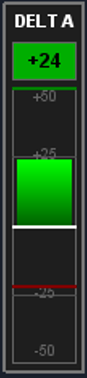


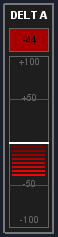
- Multiple Presets – Choose from Default, Value Only, Basic Meter, Full Gauge, Compact, or Value Only with Title. Each preset configures size, layout, and visible elements for you.
- Peak Indicators – Track min and max delta over a configurable time window. Peaks display as colored markers on the meter with optional numeric values, so you can see the extremes even as the current value moves.
- Gradient and Segmented Fill – Choose between a smooth gradient fill or segmented bars for the meter visualization. Segment height and spacing are fully configurable.
- Flexible Positioning – Place the meter in any corner or along the middle edges of the chart. X and Y pixel offsets allow precise positioning. Width, height, and value-only height are all adjustable.
- Scale and Labels – Scale markers, position indicator, title, and value readout are all optional. Each element has its own font size and color settings. The scale can display inside the meter or on either side.
- Full Color Control – Separate colors are provided for positive, negative, zero value, zero line, background, and border. The container box has its own background, border, and spacing settings.
Setup
Setup requires a few steps. The study reads volume data from Sierra Chart’s built-in Recent Bid/Ask Volume columns, so those need to be visible before the study will display tails.
- Enable Required Columns – Go to Trade > Customize Chart/Trade DOM Columns and move Recent Bid Volume and/or Recent Ask Volume from Hidden Columns to Visible Columns. At least one must be visible.
- Add the Study – Open Analysis > Studies on the Chart or DOM where you want tails, search for “gc: DOM Momentum Tails,” and add it. Assign the Bid and Ask columns in the Study Settings.
- Set Combine Increment – Leave at 0 (Auto) to auto-detect from your DOM price scale, or set a manual value. Auto mode reads from your Scale Settings and keeps everything aligned.
- Check Chart Update Interval – Since tails are time-sensitive, a lower update interval captures more activity. Go to Chart Settings > General > Chart Update Interval. Sierra Chart warns that very low intervals (50ms or less) across many charts can increase CPU load and cause data lag. Adjust based on your system and number of open charts.
Note: You can install the study directly into a Recent Bid/Ask Volume column. The study will overlay tails on top of the existing volume data, saving you a column. The study includes a repaint option to cleanly overlay its own volume text on top of Sierra Chart’s native text.
Pricing
Momentum Tails - Free Access
Access is free. No credit card required, no expiration. Click “Get Access” above to sign up.
These studies are built and maintained by one developer. Hosting and infrastructure have real costs. If you find the studies useful and would like to support ongoing development, contributions are welcome here: [Contribute]
If not, please use them anyway, there is no obligation.
More questions? Contact support
Thanks to the beta testers whose feedback and suggestions helped shape many of the features in this study.
Get Started with Momentum Tails
No Credit Card Required, No Expiration